Floral dingbat font for adding botanical icons via keyboard
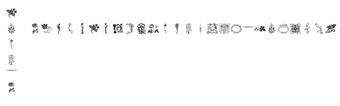
LP Flowers 1, published by LP Flowers 1, is a decorative dingbat font that supplies floral illustrations accessible from the keyboard for desktop design work. It lets users insert botanical icons directly into documents and layouts by choosing the font and typing mapped keys, simplifying ornament placement across text flows. The set emphasizes scalable vector-like glyphs and a lightweight installer. It targets graphic designers, crafters, and hobbyists who need quick floral accents for invitations, posters, and web layouts.
How the font integrates with common document and design workflows
The font acts as a text asset that designers use inside word processors and professional editors; it is noted to work in Microsoft Word and Adobe Creative Cloud applications. Because the symbols are delivered as font glyphs, they behave like text runs inside paragraphs and layers, so placement, alignment, and repetition follow standard typography controls rather than image-layer manipulation. A character map on the font's distribution page and the Windows Character Map utility let users inspect available glyphs before inserting them.
What control users have over size, alignment, and typographic behavior
Glyphs scale with font-size values and retain crisp edges when enlarged, since the set is distributed in a standard font format. Designers can treat each icon as a typographic element, adjusting size, baseline, letter spacing, and rotation through the host application's text tools. That typography-centric control makes it straightforward to match icons to heading sizes or inline text without converting to raster images.
Is installation and daily use approachable for non-technical users
Installation follows the usual TrueType/OpenType workflow: install the font file, then select it from an application's font menu. The distribution commonly provides a visual character map on its download page, and Windows' built-in Character Map utility shows which keyboard keys correspond to each floral design. These steps keep routine use within familiar desktop procedures rather than requiring custom plugins.
What to expect for compatibility, performance, and community reception
The font is available in standard TrueType form, making it compatible with any system that supports TTF or OTF files. The package is described as lightweight, so it imposes negligible impact on system resources compared with animated or raster wallpaper tools. Within the design community the font appears in curated lists of decorative dingbats, indicating steady use among hobbyists and professionals who need consistent botanical ornaments.
Recommended for creatives who need quick ornamental glyphs, with a single practical limit
LP Flowers 1 suits designers and craft-focused users who want accessible, text-embedded botanical ornaments for print and digital layouts. A practical limitation is that glyphs are monochrome by design, so producing multi-colored flower art requires additional editing or layered techniques in a graphics program. For projects that accept single-color ornamentation or where color is applied via text styling, the font is a convenient, low-friction choice.
Pros
Scalable glyphs resize cleanly without quality loss
Installs as a standard TrueType font for broad application support
Lightweight file imposes minimal system impact
Keyboard mapping lets users insert icons without external images
Cons
Glyphs are monochrome; color requires external editing
Commercial-use permissions are not guaranteed in the default listing
Remembering key-to-glyph mappings requires the character map or reference
Laws concerning the use of this software vary from country to country. We do not encourage or condone the use of this program if it is in violation of these laws. Softonic may receive a referral fee if you click or buy any of the products featured here.